Fair and Latest Stuff of WordPress

We Deliver What Our Readers Expect

Showing posts with label WordPress Customization. Show all posts

Friday, 1 November 2013

Getting Problem in Testing WordPress Without Device? Read Following Tips

No matter you are a site owner or theme developer, you must require different devices to test your WordPress site. It would be excellent to have different varieties of devices for testing. However, if you don’t have then emulators are helpful. In this post, we are going to provide you different alternatives for setting up emulators for iOS and Android.

Testing WordPress Without Device

One of the daunting tasks for WordPress developers it is to test WP sites on different platforms. Getting a site that looks the same in every platform like IE6 is a bit difficult. Nowadays, businesses also want their site looks excellent tablets and smartphones. No doubt, responsive website helps to deal with every platform, but before launching or upgrading a site, it is must to test on basic platforms to make sure its effectiveness.

It would be nice to be able to keep an up-to-date library of cool gadgets to be able to test on but not only is this expensive it would probably mean that we’d never get any work done. There are many different types of tools available for testing different platforms. Moreover, it won’t hit productivity as well.

iOS Simulation For Testing iOS Devices

It is advisable to use Apple’s own iOS Simulator app for testing a site on the iOS devices. a site on the iOS devices is part of XCode, Apple's "integrated development environment…for developing software for OS X and iOS".

The simulator is a separate application that can be easily dragged to the dock and runs as needed without requiring starting XCode first every time. If you want to get XCode, you have to signing into an Apple Developer ID. Go to Downloads for Apple Developers for downloading XCode and write down ‘xcode’ and select an appropriate version for your running OS X. after downloading, follow below given steps to instal Xcode.

  • Open a Finder Window and click on ‘Application’ option.
  • Press Right-click on XCode and click on ‘Show Package Contents’ available in the context menu
  • Now, Open Contents > Developer > Platforms > iPhoneSimulator.platform > Developer > Applications
  • After that, see iOS Simulator listed and drag it to the Dock for easy assessment
  • While opening the application, it will start as the previous device you simulated or iPhone you used first
  • WordPress developer can easily change mobile device by clicking on the Hardware menu item and rotate it through same menus or by shortcut keys
  • Click on the Hardware menu item to check WP site and enter your URL in the location bar.

Android Simulation On OSX / Windows

It is simple to access the Android Simulator, if it is insignificantly more complicated process to accessing the iOS Simulator but, is valuable effort. Now, we are going to install the Android SDK that available for different platforms like MS Windows and OS X. follow below given instruction for installing MS Windows and OS X:

  • First of all, download the Android SK
  • Run the installer on windows and unzip the download on a Mac
  • Now, go to installed / unzipped folder and click on Tools > Android. Now, you will see a command prompt and the Android SDK Manager application will open
  • After that, check the Android 4.3 folder and then, Install (x) Packages (It will take some time)
  • Once installation process get completed, you have to set up virtual devices to simulate by click on Tools > Manage AVDs that is available at the SDK Manager menu
  • Create your own or click on Device Definitions and then, choose a device and click on Create AVD and press OK. Now, you will see your device listed in the List of existing Android Virtual Devices
  • Now, you have to highlight your device and press on ‘Start’ option. Ensure to determine the scale of display real size and click on ‘Launch’ option

Other Option:

BrowserStack, a web-based browser testing, is other option to test your website, if you don’t want to install the SDKs. One of the best things about this is it doesn’t installation for testing external websites. Developers can check a huge range of devices and platforms, adding browsers and desktop operating systems as well.

Conclusion:

Confused!! What option is best? It is up to you whether you go for installing the SDKs or BrowserStack. Adopting BrowserStack allows to test through one interface, including various desktop operating systems and browsers. So, if you are developing Ecommerce Website for Mobile Phones or any other site in WP, check out our option of testing your website.

Image Credit: smashingmagazine.com

Author Bio:

I am , working with WordPress development company Perception System. It provides hire WordPress developer service for theme, plugin, design and development at affordable rates.
Twitter | Website

Monday, 28 October 2013

WordPress Embellished with Collaboration & File Sharing Features with Cloudup Acquisition

WordPress is a free as well as open source blogging tool that based on PHP and MySQL to run on a web hosting services. Comes with numerous features, it is a great CMS and open source blogging tool that used by more than 18.9% of the top 10 million websites as of August 2013. However, this new CMS also embellished with many new features like collaboration, file sharing with cloudup acquisition and more.

WordPress Embellishment

Last month, WordPress.com's parent company Automattic added its main aim of world domination, which is powering most of the planets' websites with the buying of file-sharing startup Cloudup. Providing more information on these new features, Cloudup is still in its beta test stage, so it is not obtainable in the market for public. Mainly, this new features' technology is focused on helping you share videos, music, docs, images, drag and drop type environment.

One of the best things is that you can also share videos live with the audience at the time of uploading files with sync. The company decides to done this deal because WordPress clear interest in enhancing content and sharing. However, the terms of the attainment are not released. The company 'Automattic' is going to keep Cloudup in beta phase as well as will accept some additional 5000 beta users on the company' site.


Recommended Reading: How WordPress as a CMS Helps Effective Control?


However, WordPress also clarified that it will use Cloudup technology in order to generate wished elements of WordPress blog like collaborative editing, where two or more than two people can easily work on the same post. By considering this feature in mind, we can say that it is a big enhancement for blogs with different owners. If you are looking to edit another blog post of any person, who is already in it, you will be served with a warning of their presence and will get option to take over their post.

You can prevail their work if you have edited post of any person without knowing them. Previous month, Automattic founder Matt Mullenweg said that "he intended for WordPress to be the platform behind most of the world websites – an ambitious goal, but he already has about 20 percent, and his company's market share is growing by about two or three percent a year".

Summary: "Now, WordPress has been embellished with some new features like collaboration, file sharing and many more that will be extremely helpful for blog users. To get more information about WordPress and its features, you can continue your ready and make yourself aware about these features".

Author Bio: Perception System

We at Perception System, provide all types of WordPress development services like theme, plugin, design, customization, etc.. We always happy to see you come up at us with WP queries. Click here to dig deep hire WordPress developer service.

Twitter | Facebook


Friday, 6 September 2013

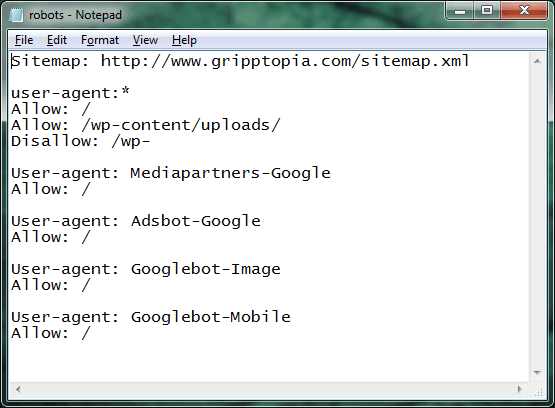
Is Using Robots.Txt File Tutorial for a WordPress Site Beneficial?

The robot text file, which is also known as robots.txt, is a very popular and long-running web standard that can be used to prevent Google and other popular search engines to access some parts of your website. Many of you all may think that why to block Google and other search engines from parts of your website.

The most common and important reason is to prevent Google from indexing pages on your website that are duplicates of pages. Apart from this, you can also prevent those pages that are not important for indexing like portfolio page, contact us and more.

Guide To Customize

As we all know that Google is penalizing sites that are with duplicate content. The other major reason is to prevent Google from linking to undefended premium content on your website. There are various, who like to prevent Google from using their images in Google search or from downloading large files so they can use robots.txt files.

Apart from this, if you are running a large authority WordPress website, Google may be loading the same page for several times with different names, using up a big part of your bandwidth and webserver computer processing power.

Guide To Customize

Through special robots.txt file, you can tell Google to only access those pages for only one time. With the help of robots.txt, you can tell Google about your XML or text site map as it indexes new pages on your website as quickly as it re-crawl your website.


Get Basic Information about Robots.Txt File:

In the root directory of a website, the robots.txt file is an optional file. In your robots.txt, you are also allowed to implement a crawl-delay: directive that helps to scale back bot crawling activity. Users of robots.txt can also add one or more sitemap: directives with a reference to your website’s sitemap or sitemaps.

At the time of editing this file, it is essential for you to be careful as you can mistake at this stage and block the search engines from accessing your website. Many of you may get a 404 file not found error which means you have made mistake anywhere and you don’t have a robots.txt file. You will see a simple text file with lines labeled user-agent, sitemap, comment lines, disallow, plus blank lines and more.

Guide To Customize

Get Robots.Txt File In WordPress:

Here, you can find some instructions that will work for you if you use WordPress to manage the root of directory of your website. It means your major blog doesn’t have any words in it after the domain name.

For an example if your main WordPress page is http://xyz.com, WordPress manages your robots.txt file. But if your main WordPress page is http://xyz.com/blog, may WordPress doesn’t manage your robots.txt file. Now, you need to work on it directly using FTP upload.

Guide To Customize


Robots.txt WordPress Plugins:

On the web, you would find lots of SEO plug-ins that can create a robot.txt files that can be used very carefully as it can stop Google and other search engines to index your legitimate pages.

We can say that it is the silliest errors that can harm your website’s ranking. iRobots.txt SEO is a great plugin that can creates the robots.txt files. By using this generator, you cannot block or allow anything easy like a sitemap line to tell Google and other search engines to find your sitemap.


What You need to put in your WordPress Robots.Txt File?

Generally, if you want to block WordPress login and help directories that all start with WP. You need to put this code under allow: or Disallow. You also need to add the following code:
Allow: /wp-content/uploads if you want your images to display in Google and Bing pictures.

Google will get only an error page when it tries to index a trackback, so add this code too:
Disallow: */trackback. It is better for you to use this line to enable Google to crawl all the content to get targeted ads if you are using Google Adsense.

Image Credit: flickr.com, searchengineland.com, gripptopia.com, wordpressians.com

Author Bio:

Myself . I am a WordPress developer and consultant at WordPressCMSExperts since 2005. I am fond of writing and sharing knowledge through my words. I’m an active writer and speaker of WordPress related service like WordPress theme design, plugin development, etc.

Tuesday, 3 September 2013

Guide To Customize Your WordPress Theme with Child Theme

Are you using WordPress theme on your website? No matter whether it is a free or a commercial one, if you want to customize it as per your requirements, then it is easily possible for you. Finally, you have decided to custom your WordPress theme as per your business requirements, you can make use of Child Theme that allows to keep your changes, so you don't make changes to the original theme.

Guide To Customize

Before you opt for Child Theme, it is very much important for you to get complete information about it or how it works. There are lots of different reasons that WordPress developers have started using child themes.

It gives an opportunity to developers to customize a unique layout on top of another existing theme. Being a perfect solution for beginners, it enables people to play around with building their own themes that best meet with their business requirements.

What is Child Theme Exactly?


A WordPress child theme is a theme, which takes over the functionality of another theme that is also known as parent theme. Through this child theme, you are allowed to modify and add the functionality of that parent theme.

Being one of the safest ways to modify an existing them, child theme is also easy-to-use no matter whether you are looking to some minor changes or want to customize an entire theme. You can also develop a child theme instead of changing the theme files directly.

Generally, a child theme is a WordPress theme, which runs along with original WordPress theme and it overrule the parts of it as per your specified. Without changing the original one, you can easily modify with your required features.

Get Started with Child Themes


For your information, child themes are not as difficult as it sounds. One of the key benefits of using parent theme is that you do not have to write all the HTML/CSS from scratch. This theme automatically uses any template files that you have included like footer.php or sidebar.php. In any case, if you are missing, child theme will put all the same files from its parent.

However, this functionality also provides a complete range of features to customize already obtainable templates. This functionality is also excellent for touching up areas that are around your website for special events like adding designs for any special seasons like Christmas, Thanksgiving Day, New Years or more.

How to Do It?


Firstly, your original theme that is also known as parent theme, lives in your /wp-content/themes/directory. For an example: develop a child theme for WordPress default Twenty Twelve theme. After that, create a new directory along with the Twenty Twelve themes in order to develop a child theme.

Child Theme Directory

All the directories require inside to be a valid child theme that is a style.css files with the following content:


1
2
3
4
5
6
7
8
9
10
11

/*
Theme Name:     Twenty Twelve Child
Theme URI:      http://wpdailythemes.com/
Description:    Child theme for Twenty Twelve
Author:         Joseph
Template:       twentytwelve
Version:        1.0.0
*/
@import url("../twentytwelve/style.css");

Mainly, there are two important parts there:

Template: twentytwelve - that tells WordPress that this theme is a child theme of the twenty twelve theme.

@import url "/twentytwelve/style.css" that loads the parent theme style.css as a starting point.

Now, you can easily log into your WordPress dashboard and can see your Twenty Twelve Child Theme there and get it. Finally, you will get your very own Child Theme that has some cool features of your desire.

Got Your Own Child Theme & Thinking Now What to do?


Now, whenever you look forward to customize your own theme, you can do it in your child theme. In the parent theme, files in your child theme overrides files of the same name. So, if you want to change any file from your parent theme, you need to copy your child theme and then make your modifications there. The same goes for any template that may not be included in your parent theme. Now save them in your child theme and WordPress can use it.

So, this is the complete guide to customize Your WordPress theme using child theme that allows you to modify your theme with your desired features.

Author Bio:

Myself . I am a WordPress programmer and consultant at Perception System. I am fond of writing and sharing knowledge through my words. I’m an active writer and speaker of WordPress related service like WordPress responsive theme design, plugin development, etc.

Sunday, 25 August 2013

How WordPress as a CMS Helps You Take Effective Control of Your Site?

Today, it is very much important for you to have a website in order to show your work and find customers. However, it is quite difficult to develop and manage a website because of several reasons like big budget, you are not professional developer and you wanted to make your website in control.

WordPress Privacy

Across the world, there are lots of professionals, who hat to wait for experts to update their website so they are in search for such system that enables them to change their text by their own. Apart from adding text, they can add images, video and sound instantly.

Well, having such controls of website is not easily possible for you after all you are not a web developer. As we all know that website development is in very much demand as the market is exploding with beautiful and attractive designed websites that you can use to expand your business on the worldwide level.

To adorn these beautifully designs, you can use creative content that offer the magic ingredient X. when it comes online marketing, the best thing is that you are natural to develop media content that provide you a competitive benefits.

To develop a professional, affordable and best looking website, all you need is user-friendly CMS that maintains your website. You can make use of open source solution that widely used by millions of developers globally. When it comes to open source solution to develop a dedicated website or blog, you can opt for WordPress that takes full control of your website.

By using this CMS, you will come to know that how much control to exercise over their input. No matter whether you have website or blog, it is very much important to enabled comments and you can choose how much authority to exercise over the comments appearing on your posts. Many of you all have one of the most fundamental questions is whether to choose first approve a comment before it appears on your blog or.

● Leave unchecked - Many times, you want to get the discussions going on. However, it is also possible that you know in advance that you are not around to moderate comments when a pre-scheduled post goes live that result in long queue of comments and an empty comment section.

Sometimes it is also possible that you are a beginning blogger and want your audience to remove any kind of difficulty to their feedback. In such condition, you need to let comments drip in as they are submitted since a lively comment section. You can also moderate your comments later after they have been published on your blog or website. You can remove if you find anything that is inappropriate.

● Check the box - However, there are various bloggers and website owners for whom complete control of a post comment section is must. Various people prefer for particular types of comments like short, long, supportive and more and want to avoid such comments that are redundant or less-substantive.

If you are receiving comments regularly on your blog, it might be good for you to consider spacing them out to make the discussion more organic and boost its longevity. To approve each every comment may take your lots of time and work, but the reward is a blog which meets your personal preferences to perfection.

Apart from approving comments, you will also have the power of deciding whether to allow anonymous comments or rather you need visitors to offer their name and a valid email address.

To get more information on WordPress control, you can check-out this video and get more information:

Author:
is a tech guy with WordPress development company Perception System. It leads great with WP scenario by giving hire WordPress developers service to its clients.

Monday, 19 August 2013

14 Quick Tips To Make WordPress More Secure

One of the most popular platforms for sites, WordPress attracts number of webmasters to expand their business and take vantages of that. It becomes very common for every webmaster to get website hacked, so it is essential to take some precautionary steps to avoid such types activities occurred with your site. To sort out webmaster's problem, here we come with some quick tips that must webmaster taken into consideration to make their WordPress site secure.


1# Update Your WordPress themes and plug-ins regularly:

As a professional person connected with WP platform, you have better idea that some themes and plug-ins face vulnerabilities each month. So, it is advisable to update all your themes and plug-ins taking helps of WordPress developers. If you are not doing so, you might trap into hacker's nest.

2# Shift Your wp-config file one level up:

One of the excellent practices make by admin is to move their wp-config.php file one directory up. Before moving to one directory up, you have to ensure to get the permissions right.

3# Limit login attempts:

It is important to limit login attempts, so to avoid any brute force attacks. Having such type of security, you can easily keep strangers out to your site and make it more secure. You can also have option to install plug-in or select 'Add New' and find WP-DB-Backup option that mentioned above.

4# Mange Your WP with Strong User Password:

Most importantly, webmasters have to create a strong password no matter how much awareness is raised around the danger. You can also take help of online password generator for create strong password, using uppercase and lowercase letters, numbers and special characters.

5# Hide Your Username:

It becomes difficult task for user to guess both username and password. For your security, it is recommended to hide username by going through "Users" menu item in WP and go to each user for selecting an optional display name. You can create display name as your company name, your name or anything else.

6# Take Backup Regularly:

Taking backup of your website frequently is one of the wisest things you will do for your site. There are many different types of plug-ins available online that takes back up automatically. You just have to install them and use. After taking backup of your site, ensure to keep it at the most secure places or copy them to CDs.

7# Add 2-factor authentication to your site:

Add 2-factor authentication is another great ways to save your website from hackers. Having such option creates difficulty for hackers to access your admin page.

8# Add a firewall:

If you are unsatisfied with the level of protection WordPress and server scripts offer, then you have to add firewall in your WP website.

9# Scan Your Themes:

A collection of fantastic themes are available for WordPress. It doesn't mean that all are safe to use. Before implementing to your website, you must have to scan your theme files frequently to ensure there are no backdoors.

10# Observe files changes:

One shouldn't hack your website overnight. There are some intelligent hackers that plan for week before hacking any site. So, you have to be aware of that and observe all changes on your website to catch hackers before you deal with big loss.

11# Fight back against DDoS:

Sometimes, DDoS attacks can be horrible. So, webmasters have mitigated those types of threats by using mod_evasive to take evasive action while their site is being hacked by anonymous.

12# Implement third-party Services To Stop Attacks:

Another thing you can use for stopping spammers, SQL injection, and even DDoS attacks is implementing solutions like CloudFlare.

13# Check Out CSRF:

I know CSRF attack is new for you as we are not hearing about frequently. However, you have to make sure to protect your website against them. Such type of plug-in might be helpful for you to sort these problems.

14# Remove spam registrations:

Lastly, it is must to remove spam registration for security, if you are allowing registration option in your WP site. However, it is not a good option for every site, I know. Other thing you can do is install plug-ins to remove or block spam registrations.

So, above listed are 14 quick tips for making WordPress site more secure. Hope, you will implement these tips to your site to avoid hacking. If you are finding difficulty or have any other questions related to hacking and security, let us know through comment section.

Author Bio:


loves to write blogs and shares his knowledge through blogging. Working at Perception System as a WordPress developer, he always makes his clients happy by delivering excellent WordPress development services.

Monday, 22 July 2013

SiteCore – An Excellent & Multi-functional .NET Content Mangement System

In the haste of providing better customer experience and shorten the time of customer acquisition, companies are looking for a unified platform that lets them provide the interactive customer engagement. A website is a platform with which companies can connect to the larger audience, utilize customer behavior and display the content relevant to the services and product it deals with. With changing customer patterns and technologies, it is required to have a website that offers required flexibility, scalability and ease of use to meet and support the requirements from time to time. This is where the role of CMS starts.

A good CMS or content management system delivers the required suppleness along with modular functionalities to ease the management of website and its content. There are many content management systems available such as Umbraco, Sitefinity, Sitecore, Magento, Dot Net Nuke, etc. which can transform the process of website content management and produce the expected online results with a wide array of features. Opting for any of these CMS is a tough task and requires one to define the priorities and features it is looking for in the CMS. While marketers and decision makers look for customer experience capabilities, developers and IT strategists give more weightage to dynamic infrastructure, tools, and capabilities for better performance.

Sitecore is the one which bears features of a great CMS. It is built on .Net framework and possesses remarkable features for today’s market-oriented websites. It offers enough customizations and convenience that lets your developers bend towards productivity in no time. Whether it is a corporate portal development or an online community website, Sitecore has all the features to accommodate your needs in an efficient manner. Besides these, what really separates Sitecore from other CMS is its out of the box functionalities and features which certainly mounts enough reasons to choose it above other CMS.

Sitecore CMS Solutions

User-friendly Interface:


Sitecore has a simple yet intuitive Microsoft- Ribbon like user interface. With this easy-to-use user interface you can instantly make changes and updates in your website and portal even if you do not possess technical knowledge.


Integrated SEO Module:


Sitecore has an integrated SEO module to help you optimize your website from a Search Engine Perspective. It gives you an ability to optimize your content right in the editor and create SEO-friendly URLs so that you can leverage organic rankings in all the search engines.


Multisite Development:


Sitecore provides multisite management and content sharing capabilities across many sites. This can be beneficial for larger organizations seeking a single platform for managing their wide number of websites.


Seamless Integration:


Sitecore being based on Microsoft technologies supports out-of-the-box integration with various Microsoft business applications such as SharePoint, Dynamics CRM, Active Directory, etc. that fits your existing investment.


Cutting-Edge Development Environment:


Sitecore provides a powerful development environment to design and develop your websites and web applications leveraging .Net and XML standards. It is also compliant with World Wide Consortiums and supports Cascading Style Sheets giving you a cutting-edge development environment.


Multiple Device Friendly:


Sitecore features intelligent elements that repurpose the content in different formats and styles for different devices such as laptops, Smartphones, tablets, iPads, etc. Its unique shrinking and viewing standards automatically detects the devices and presents the content in the best possible view. Sitecore also has cross-browser compatibility to optimize the website view for multiple browsers such as Chrome, Firefox, IE, Opera, etc.


Internationalization:


Sitecore features multi-lingual capabilities to support the organizations spread globally in managing their content. It allows you to simplify the management of multiple language version sites and translation process in your native language with its powerful integration with Clay Tablet’s Rosetta Gateway and Lionbridge Technology’s Freeway.


Social Media Engagement:


Social Media Engagement

Sitecore CMS Solutions comes with social media engagement options to plug your site with a network like Facebook and LinkedIn, and continue the conversions across the social media. It also features pre-built components such as forums, polls, wikis, surveys etc. to help you nurture your own community.

Besides all these features, Sitecore supports cross channel target marketing, e-commerce and email marketing integration, multivariate testing background and much more.

Looking at all these features, we can say Sitecore gains a popularity of a preferred content management system for website and web application development with a right focus for developers, marketers, business owners and SEO specialists. It is an enterprise ready tool that can boost your online presence and drive you towards higher ROI. So, if you have decided to get Sitecore CMS based website, you need to make sure to go with CMS Experts, who has complete experience in this industry!!


Author:


Hi, this is Shrutika Bhatt working with Cygnet Infotech. I Love to write and share about Information Technology. Cygnet Infotech delivers technology-enabled business solutions that help companies to improve efficiencies in business processes. It offers a wide range of IT services in technologies like SiteCore CMS Development, Umbraco CMS Solutions, SharePoint, CRM, Java, PHP, .Net Application Development, iPhone, Android, etc by leveraging its domain & business expertise.

Sunday, 3 February 2013

WordPress Customization: Make Your Blog & Website More Attractive

There are many web masters, who are not happy with the default themes of WordPress as they think that these default themes are not functioning well. Web masters want to represent their business image very efficiently, so WordPress customization is one of the best options for them as it gives their business a new image amid your customers.

If you are also one of those web masters and looking to get a customize your WordPress theme, then Perception System is serving a range of WordPress services like WordPress web development, CMS, blog, plugin, theme, customization and many more WP services.


Now, you can easily choose a WordPress theme design according to your business needs and our WordPress experts customize it for you to make your online business more productive. One can enjoy a wide range of WordPress customization services like coupon press theme customization, theme customization, plug-in customization & development, search engine friendly, etc. In short, webmasters can easily get an eye-catching website or blog and enjoy various benefits. By adopting this service, you can also boost the performance of your site and enjoy excellent results. If you want to change the content of your site or want to make other changes, it becomes easy with the use of back end.

Webmasters can enjoy lots of innovative features by adopting WordPress customization service. Have a look at the benefits of Word Press Customization:

Ability to customize WP themes:

By using this service, webmasters are allowed to customize the themes of their website or blog and give attractive look. Webmasters are also capable of creating their own theme and can customize the old one.

Control over Widgets:

Webmasters will also get the control over widgets by which they can control the elements that appearing in the sidebar and they can also see that in which order that are appearing. Having control over widgets, they can also make proper use of widget for different blogs.

Development of plug-ins and customization:

Webmasters can customize their plug-ins to offers their customers an easy navigation of their blog and website. They can find various developed plugins that are easy to use for their customers.

However, it is most important for webmasters to outsource their WordPress Customization service to WordPress Development Companies as these companies are professional in developing WordPress theme, customization, and WordPress design integration and so on.

Look here for more interesting information on related topic.


Thursday, 17 January 2013

Get a Professional WordPress Customization Service


We all are well aware with WordPress, which is a desirable open source blogging tool by which we can easily update content on our blog and website. WordPress is one of the most powerful blogging tools, which is also used as a Content Management System. Today, WordPress has gained huge popularity as there are more than 200 million websites on the Internet that are using this CMS. If you are looking for WordPress blog customization, then it becomes easily possible for you as there are many companies that offer WordPress blog development service and also customize it as per your needs. It comes with a range of features that you can enjoy and increase the awareness about your products and services on the web.


With the advancement in the technology, all the people are able to share their views and give suggestions and all these become true with the presence of content management systems like WordPress. No matter for which purpose you want to use this CMS, but it is for sure that you will get lots of features to enjoy. Moreover, WordPress customization is one of the best options that obtainable for all the people, who want to get a user-friendly experience. The best thing about WordPress is that it comes equipped with different tools that are much useful for you.

It comes with a template system as well as Plugin architecture. When it comes to talk about WordPress template system, it has widgets that enable people to customize the pages of their website or blog without editing PHP and HTML coding. It also has WordPress blog themes that you can edit according to your needs and get more advanced customization. Apart from these unique features, there are many other features that you can enjoy like clean permalink, link managing, and search-engine friendly arrangement. Because of these exceptional features, WordPress is a leading and valuable open source application that allows users to enjoy various aspects that they are looking for.

In short, WordPress blog development is best decision for you that allow you to gain huge popularity and increase your brand image on the web. For WordPress blog customization, you need to hire a WordPress developer, who has years of experience in Wordpress blog development, Wordpress blog design services, open source development and more. You can find many WordPress developers, but make sure to hire a professional one, who claims to be a unique service provider.

Are you looking to hire WordPress developer? If yes, then Perception System specializes in all types of open source development. The company has a professional team of WordPress developers, who work hard to provide its clients desired services.

Monday, 24 December 2012

WordPress Customization: A Best Option for your Blogging


We all know that WordPress is an open source blogging tool as well as Content Management System. This open source blogging tools is based on MySQL and PHP database, and it is considered as a must have tool by which one can get a high Google ranking. There are lots of new websites that are using WordPress Content Management tool as it is a required CMS of the present times. This CMS carries a complete range of features like a template system, plugin architecture, and more. In this CMS, you will also get an option for themes that you can modify the display of a website template.

With the help of WordPress web design, one can easily edit the content as well as add inputs like pictures and more multimedia products. This system is compatible with different browsers and operating systems, so there is not need to bother about anything. Being as a most popular and powerful Content Management System, WordPress customization has help a lot of people, who are looking to get wonderful blogging experience. It is an extremely easy and user-friendly CMS that allows you to manage your content very easily.

To develop a content management system, there is nothing like WordPress as it wins the heart of millions of people. Across the world, there are lots of people, who are using WordPress customization service to provide their customers a wonderful experience. By using WordPress development, you are also able to updates changes that are made in new entries and templates. People are also able to import very easily the text pattern and variable type blogger. With its advanced registration system, people are allowed to register on any blog website. And, the best feature is that videos, pictures and contents can be posted very easily.

The major benefit of WordPress customization is the appearance of the blog and site, which can be modified also to change the entire look of any site as well as blog. You can also use its theme feature by which you can change the appearance of your blog. As per your need and choice, you can choose any theme and make your blog site attractive. You are also able to hire WordPress developers to get high quality WordPress customization service. Make sure to choose an experienced developer, who offers state-of-the-art solutions. Don't forget to get complete information about WP: WordPress Design Integration - To Groom your Web-Site

Monday, 13 August 2012

Custom WordPress Developers Can Customize Your Blog With Great Themes And Plug-ins

People are always keep there eyes to share information and their thoughts online. Blogging is most common way to communicate that people like to share any of the information. Many users prefer to use WordPress, as it is user friendly and also it is easy to use for custom WordPress developers to start work on WordPress without much effort. Custom Wordpress development provides it's users a benefit to create any look according to requirement. You have another choice also for customizing your blog, and that is you can hire WordPress Developer to get your customized WordPress website done easily and quickly. There are a number of individual developers as well as outsourcing agencies, which will help you to get your own professional WordPress website designed and developed at competitive market price.


During WordPress development if you need to download theme online then it is most important that you should have authority from the theme designer. The most important think after selecting custom theme is that it should be required to link back that theme to their respective site. Accept that you have also another option to use default WordPress themes.

Accept themes, you can also use plug-in to attract more visitors to your website and is used readily by the WordPress developers during the WordPress development. WordPress Plug-ins which is developed by the WordPress plug-in developers that enable you to add hundreds of different kind of features, effects and benefits to your blog. It allows users to modify and customize easily to a WordPress and instead of bringing change to the core programming of WordPress, you can add more functionality with WordPress Plug-ins.

To understand the functionality of WordPress is not hard. It is designed to be user-friendly and even if you don't have much knowledge about computer and technology, the interface would guide you properly and help you through all the tasks. There are also set of instructions that you could use while working on plug-in. WordPress plug-in development will become more effectively without any trouble.

Moreover, to install plug-in into your WordPress is not that much difficult. You just need to do is to upload your plug-in, go to WordPress site with the help of browser, click on the link of the plug-ins, find what you want to be uploaded and click "Activate". Thus, WordPress web development is not a difficult job to do as it is designed to be user friendly and even a beginner can work on it.

Advantages of Custom WordPress Development....
  • Developers can easily create perfect e-commerce solutions complete with shopping carts and secured payment gateways, which is one of the hot things in the market currently.
  • WordPress CMS development is one of the most powerful in the world, which allows users to easily manage and publish content on websites. This doesn't call for expertise in technology.
  • It gives you the chance of developing unique website from scratch. No longer you have to depend on the website templates and themes supplied by WordPress or other third-party developers.
  • The availability of third-party object and applications make it easy for you to create a project. You can integrate some of the best applications to track visitors, provide your website, and make it more interactive for the visitors.
  • You can play with color and graphics about your choice for your projects. So, if you are planning to theme your website around the color of your products or use some graphics and multi-media elements in your website, this is the platform for you.

Saturday, 21 July 2012

How to Find Unique Custom WordPress Blog Themes!


It is very easy to set up a blog in WordPress and gives you tremendous flexibility. Wordpress blog development o your site and leaving a template set to the default will not separate your blog from others. There are millions of WordPress blogs being setup everyday you just need to customize your Wordpress blog.

WordPress customization services made simple for you.

The single and most important customization of your WordPress blog is the look and feel of the blog. To change the look and feel of custom WordPress blog design you just need to add theme. You can found many different attractive themes from websites free of cost. May be ten or more sites that all are using same themes it means your blog's look and feel appears same.

Another problem with customization of your blog is that it is time consuming process to select unique theme for your blog. Many people will start searching for WordPress.net themes there are many themes are available for free but this try will not much helpful to your WordPress blog theme selection. The themes are very generic and not very keyword specific then your ability of blog customization will becomes happened.

The ability to custom WordPress template development of your own blog is makes your WordPress blog not only quickly but also different from other sites and it's look will be great. I am going to let you in on a big secret that I found that can help you do just that . You will not only have the ability to create a truly unique theme but you'll be able to customize it any way you feel you want. You can add your own backgrounds, photos, artwork, etc. The sky is the limit.

Are you not sure what kind of theme you want to go with?

This secret package will randomly create a theme for you. Then when you find the theme that looks good, you can customize your WordPress blog by changing the various options available to you.

Which options can you change?

You can change the colors, the background, the fonts, the styles, the headers and footers, and the menus. You can structure your whole theme around WordPress or choose Drupal and Joomla if you so choose. You can even structure the site to work as generic HTML.

So what is this secret product that can magically transform your blog (or site) into a unique, fun, and fantastic looking design in a matter of seconds? In my resource box, I have given you a link where you can find this incredible product. The creators give you the ability to download a trial version so why on earth would you not even give it a try? Or you can contact to our Hire WordPress developers for customize your website who are working for our Wordpress website development. You know have no excuse whatsoever to not customize your WordPress blog .

Wednesday, 11 July 2012

WordPress Website Customization and Development Features


What you need is an attractive design and a simple yet effective layout. You can easily get one through the power of the CMS web design coupled with simplicity of the PHP coding. Many Hire WordPress developers use the above combination and their own creativity for examples of amazing WordPress web development.

The overall appearance of a website gains more importance if it is developed for professional reason, especially for your business. So, a WordPress developer should always try to use the extra plug-ins available to bring newer and innovative looks for the website.Developers should keep an eye on using the WordPress customization while actually developing the web sites.

If you are thinking or you have made your mind for WordPress CMS development, there are so many outsourcing companies form where you can have it. These companies also provide you custom WordPress development with a very affordable rate and super quality.

WordPress seo is friendly and you can use this for increasing the traffic on your website and can generate some good money out of this. WordPress is also most secure nobody can change or edit its core. This will give you assurance for the code security as nobody can hack it. It also provides the load balancing facility and you can easily work in a condition whenever there is rush or heavy traffic on your website.

Automatic up-gradation is provided by WordPress integration so whenever new version comes to you don’t need to upgrade, it automatically makes it without any Webmaster. WordPress have the backup of your blog. You don’t require any backup for your blogs.

There are so many other benefits why one should adopt WordPress CMS development for the establishment and enhancement of business. WordPress theme development process is easily affordable. You will get WordPress templates and themes at very low rate. WordPress is very easy to access.

Anybody who can access Internet or use Facebook, can easily access it. You can do any changes you want and everything will be there on your screen so there is no need to depend on the Webmaster. Multiple users accessing authority is also available which means anybody can access it from anywhere.

Word Press is an open source content management system. With its evolution in the year 2003 it’s gaining popularity and trust among its users. Word Press CMS development has become essentials for the development of your business. Now when the ecommerce is gaining its pace and big brands are made within no time or very short time of period, WordPress CMS development has its own importance.

Monday, 9 July 2012

WordPress Website Customization and Development Features

What you need is an attractive design and a simple yet effective layout. You can easily get one through the power of the CMS web design coupled with simplicity of the PHP coding. Many Hire WordPress developers use the above combination and their own creativity for examples of amazing WordPress web development.


The overall appearance of a website gains more importance if it is developed for professional reason, especially for your business. So, a WordPress developer should always try to use the extra plug-ins available to bring newer and innovative looks for the website.

Developers should keep an eye on using the WordPress customization while actually developing the web sites.

If you are thinking or you have made your mind for WordPress CMS development, there are so many outsourcing companies form where you can have it. These companies also provide you custom WordPress development with a very affordable rate and super quality.

WordPress seo is friendly and you can use this for increasing the traffic on your website and can generate some good money out of this. WordPress is also most secure nobody can change or edit its core. This will give you assurance for the code security as nobody can hack it. It also provides the load balancing facility and you can easily work in a condition whenever there is rush or heavy traffic on your website.

Automatic up-gradation is provided by WordPress integration so whenever new version comes to you don’t need to upgrade, it automatically makes it without any Webmaster. WordPress have the backup of your blog. You don’t require any backup for your blogs.

There are so many other benefits why one should adopt WordPress CMS development for the establishment and enhancement of business. WordPress theme development process is easily affordable. You will get WordPress templates and themes at very low rate. WordPress is very easy to access. Anybody who can access Internet or use Facebook, can easily access it. You can do any changes you want and everything will be there on your screen so there is no need to depend on the Webmaster. Multiple users accessing authority is also available which means anybody can access it from anywhere.

Word Press is an open source content management system. With its evolution in the year 2003 it’s gaining popularity and trust among its users. Word Press CMS development has become essentials for the development of your business. Now when the ecommerce is gaining its pace and big brands are made within no time or very short time of period, WordPress CMS development has its own importance.

Thursday, 28 June 2012

Customize Your WordPress Blog with Great Theme and Plug-ins

One of the features that make WordPress so powerful that is plug-ins which has architecture that lets users and developers extend the functionality of the basic CMS (content management system).

The official definition of a WordPress Plug-in is as follows: A WordPress Plug-in is a program, or a set of one or more functions, written in the PHP scripting language, that adds a specific set of features or services to the WordPress weblog, which can be seamlessly integrated with the weblog using access points and methods provided by the WordPress Plug-in Application Program Interface (API).


In other words, Plug-ins is tools that let you do almost anything you want to your website. Want to add a photo gallery? A shopping cart? There's a plug-in for that.

Don't get bloated

While Plug-ins is great, they should only be used when absolutely necessary. One common problem with WordPress websites is they are overloaded with too many plug-ins. Every plug-in accesses the database, whether the plug-in is active or not. So the more plug-ins you have, the more the database will need to be accessed. Depending on your web hosting, it can noticeably slow down the website.

The number of Plug-ins depends on the features and required functionality of your website. Once you have over 15 plug-ins installed, your are at risk of slowing down your website and possibly creating a frustrating experience for the user visiting your site. So remember, don't go overboard with the WordPress plug-ins development unless you have to.

During the WordPress development, if you want to download a theme from an online source then it is important for you to take an authorization from the theme creator. You would be however required to link back that theme to their respective site. Another option you have is to use the default WordPress theme. If you have downloaded the theme manually then to add pictures for your theme is going to quite easy. However, if you installed theme automatically with the help of WordPress then you would have to download the theme into your hard drive. You can easily browse the image once you have the theme into your hard drive. You can also replace any image onto your layer just by copy and paste. After you have finished your graphics, you can reveal your customized WordPress theme.

Apart from themes, you can also use plug-in to attract more visitors to your website and is used readily by the hire WordPress developers during the WordPress website development. WordPress Plug-in is a program which is developed by the WordPress plug-in developers that enable you to add hundreds of different features, effects and benefits to your blog. It allows users to modify and customize easily to a WordPress and instead of bringing change to the core programming of WordPress, you can add more functionalities with WordPress Plug-ins.

WordPress plug-in let its users to work at a fast pace and make your page desirable and appealing in just a short span of time. There is a huge list of plug-ins if you want to add photo galleries and videos to your website. Moreover, it allows the WordPress customization services any header and footer they want. They could also add pictures they desire and put persuasive texts t attract more subscribers.

To understand the functionalities of WordPress is not hard. It is designed to be user-friendly and even if you don't have much knowledge about computer and technology, the interface would guide you properly and help you through all the tasks. There are also set of instructions that you could use while working on plug-in. These instructions will help you to use plug-in more effectively without any trouble.

Moreover, to install plug-in into your WordPress is not difficult at all. All you need to do is to upload your plug-in, go to WordPress site with the help of browser, click on the link of the plug-ins, find what you want to be uploaded and click "Activate". Thus, WordPress development is not a difficult job to do as it is designed to be user friendly and even a beginner can work on it.

Wednesday, 9 May 2012

WordPress Integration made simple for you

WordPress is an open source tool that lets you publish a blog to your site content and can be used as a content management system. It is extremely popular and has a large community following. You can include your blog perfectly with CMS two websites and blogs are integrated in the same CMS. All this and more will be a useful option and wordpress customization services popular for use in your site. WordPress SEO outsourcing India offers a variety of services customized for your WordPress web development.

Why do you need SEO Outsourcing India on your website?
  • Need to modify or change the service to the needs and demands of customers. 
  • Your customers the opportunity to see the wide range of options to offer. 
  • Offshore Wordpress Development offers a suitable solution for all your WordPress problems and ensures that your site looks the way your customers want to do. 
  • Service WordPress customization by us is customer friendly and accessible. 
  • Our team will work with all the efficiency to provide the most appropriate conversion of data from your site.
What SEO Outsourcing India offers?
  • Custom Wordpress theme design is a great feature of our own; we ensure that the enclosed item of your site’s what your business is about. 
  • A reliable workforce who want to take on challenges as they come, and come out successful in most cases. 
  • Your decision to choose our WordPress customization services will prove to be an excellent year in terms of increased clientele. 
  • We use SEO software outsourcing India, following the basic principles, so you can expect security along with a growing business. 
  • Our theme for WordPress plug-in WordPress personalization and customization, offering you the desired results more efficiently.
A signature style of your site can provide many benefits and helps you grow your business significantly.
  • Our professional WordPress theme Design to give your site a new and better. 
  • Our designers work hard to Wordpress for the best results and a way to increase your business. 
  • You have a choice of a variety to choose from, our customization services will give you the best WordPress themes WordPress. 
  • You have a website the best services to increase their profits, falling into the wrong hands, this technique may even recover. 
  • Our premium WordPress template provides a graphical interface to your site. 
  • For more information, visit the WordPress integration www.wordpresscmsexperts.com

Tuesday, 1 May 2012

Easy Way of Theme Customization for Your Conveniences


Do you have dream theme but you are too much busy to create it? Does your website need a reconstruction? Do you want an honest yet professional touch on your website? Then WordPress customization services are right here for you; websites custom-built the way you want them.

Almost all of the people are familiar with the term ‘theme’; it is like a skin for your website. It gives a compatibility and consistency of design elements to your web pages and conveys a message to your visitors about the sites purpose. It can be seasonal like any festival or like valentines theme where the icons, colors and graphics mirror the festivity or mood of the website owner, or it can portray a 'professional business-like' image. The elements of a theme include style sheets, template files and images files. To date, WordPress has over one thousand two hundred themes with 23 million downloads. The most popular themes are Atahualpa, Mystique and Thematic. These themes are available for free and can be modified.

Since WordPress theme designs are supposed to be easy to configure, you might be wondering why there are companies who specialize in the field of WordPress customization. To be get professional helps to assist you will not only lessen your workload but also help you to create a clear vision as to whatever you are going to do with your website. These professionals are well-versed when it comes to the features of WordPress web development. And there are a lot of WordPress Experts for hire you can rely on to provide you with a custom-made website for your business or personal needs.

Now let’s discuss abut the most important thing which is most affected to the customers. Cost is one of the reasons why most bloggers and webmasters choose to use premium WordPress theme development over custom designed theme. Although it shouldn't be the case, website owners are limited with their resources. The truth is, to get a good custom designed WordPress theme, it will cost you some money and so, if you are not ready to sell out funds for your WordPress theme, then a premium theme will do better.

If you are looking for affordable WordPress services and affordable SEO WordPress packages visit us.

Monday, 9 April 2012

Custom WordPress Development -The convenience of your WordPress Web design development work

But these days the website plays a symbolic role, you are in the world. All play a stimulating role in the uniqueness of your website in the world. Because of these reasons, the daily requirement of hire Web designer and a rise in WordPress development. And the website designers have begun to more efforts to implement the techniques and tools to develop unique websites.

There are several open source technologies and tools, content management system like WordPress, Joomla, PHP Majento is available online and develop a website. But all these WordPress CMS development is the best of them. WordPress CMS designer will help you to develop web portals, web pages, business directories, and your blog.

WordPress website development is the excellent and well known open source website development and blogging tool in the world. WordPress provide facility to create and maintain your website in effective manner. By hiring WordPress Developers, WordPress programmers can customize your WordPress development, themes, templates, WP modules and plug-ins.

WordPress plug-in development will offer thousands of plug-ins and modules after the improvements will increase the functionality of the website. The work of developing the module is named as a WordPress development or customization of WordPress.

In addition, visuals and graphics custom WordPress website template design will also allow you to modify your content to make it SEO friendly. You can add new keywords, and the marker you use or plan to use in your WordPress SEO campaign to make it more effective. This will give your company a great help and adjust something important.

Development Tools That You Need
  • Local Server- Your desktop/laptop is the best place for custom WordPress design and integration. You will need to turn your computer into a local server and create a virtual web server (Apache, MySQL and PHP), which can easily be done by installing WordPress into your computer. You will not need to install these server separately and will be able to do that using the XAMP (for Windows) and MAMP (for Macintosh).
  • WordPress- Although this might seem too obvious, you will need to download and install the latest version of WordPress into your workstation. This needs to be installed into your local test server from where you will be testing your theme. The installation procedure of XAMP and MAMP in your local test server is a little bit different and you need to take care of that.
  • Dummy Content-You can have dummy content to create a theme, go to the admin panel of WordPress and navigate to Tools, Import and choose WordPress from the list of options of WXR post data file. You can choose among the theme development Checklist test data, The Sandbox Dummy Content or WP Candy Sample Content.
  • Text Editor – Most developers prefer to use special graphics software for creating WordPress themes customization. You can try Notepad or Notepad if you are developing on Windows while Mac users can try smultron.
  • Browser- You can use any browser for WordPress development but Mozilla Firefox is the most recommended one. The add-ons, which make Firefox the most, preferred choice of WordPress developers around the world. The Web Developer toolbar, which gives you a whole host of options for inspecting and debugging your code, and Firebug, which lets you, inspect each element in your theme right up till the code.
  • PHP- This is also commonly used in WordPress theme design, The default WordPress theme contains a functions.php file that defines many of features of the theme. Good WordPress developers use this to modify and create their custom themes.
If you want to change the WordPress development service, then hire a developer of WordPress. Do you like it? Contact us.

Friday, 6 April 2012

7 Benefits of WordPress Customizatin

WordPress web development is an open source blogging platform that also doubles up to serve the purpose of web development and content management systems. WordPress customization services are one of the new techniques available to the users of WordPress template design and integration with which they can constantly refurbish and refresh the way their website looks and feels and that too at a minimal cost.

Hosting one's sites on WordPress has numerous advantages:

The biggest of which are the numerous of tools and utilities that are provided to create and develop and develop the WordPress website design.

Customization is another great feature with which can renovate one's site and thus add value and possibly increase the conversion rate of the visiting traffic to that website which is provided by WordPress solutions.
However, to make use of these tools and actually employ them to make the website better requires a technical knowledge of the intricacies and techniques involved with Wordpress website designing and its ancillary functions in general and with PDS to WordPress India. This is why if you want your WordPress customization to be professional, clean and efficient it would be beneficial to hire services from outside. 

Professional services that have prior experience in customizing a website will be able to design a custom WordPress theme design for you. The design can be customized to incorporate any visual or graphic element that you want there on your website. Numerous other additions and changes can be made as per your specification.
A theme is a sort of skin for your website that will alter its appearance. Numerous techniques can be utilized; however, one particular technique of converting PSD to WordPress, so that one can use Photoshop documents opens up many new possibilities. This will allow you to display any edited or structured content. 

Apart from visual and graphic parts, a custom WordPress theme development will also allow you edit your content to make it more SEO friendly. You can incorporate new keywords and markers that you had used or are planning to use in your SEO campaign to make it more effective. This will give your business a big boost and make the customization a very valuable deal.
Whether you are an individual or a full-fledged organization looking for hire WordPress developers, the 
best Web Development Company offering professional WordPress web designs/services for your website at affordable rates.

More information can be providing by our WordPress developers. Contact us.

Wednesday, 4 April 2012

Custom WordPress Blog Design – Time Saver Online Business

WordPress development of India is the system contained the most modern and modern management available today. WordPress is an application development content management system that is easy to use, cheaper, easier maintenance provides free assistance to ensure the speedy implementation of a few. And it takes less time to develop.

WordPress automatically records can process a. WordPress CMS website development is basically a blogging platform used by end users. WordPress CMS works with PHP & MySQL database programming language. The open source nature of PHP makes content easier to modify, use, share and innovate. Instant Custom Wordpress development and Wordpress programming is a cost-effective process to the actual web solutions to end users / customers....

There is a high level of scalability and extensibility that facilitate the integration of future tools to your WordPress content for effective interaction. Content management system WordPress CMS development facilitates the active participation of the display. It also provides greater control over customizing the WordPress theme designer.

Finally, WordPress website design services are readily available today, CMS, and the most personalized and cost-effective CMS platform. Many of the coast WordPress web development companies in India offering customized Wordpress development services. Would you like to outsource Wordpress Development India, or you want to rent a WordPress Developers India is the best code. Absoluuttinen all solutions is the best PHP development company India offering custom Wordpress development services in support of his own team ...
  • WordPress integration 
  • WordPress blog development 
  • WordPress theme development 
  • WordPress plug-in development 
  • WordPress Template Designing and integration 
  • WordPress CMS Development

If you would like hire WordPress developers then please Contact Us.